

Collect Files over SFTP
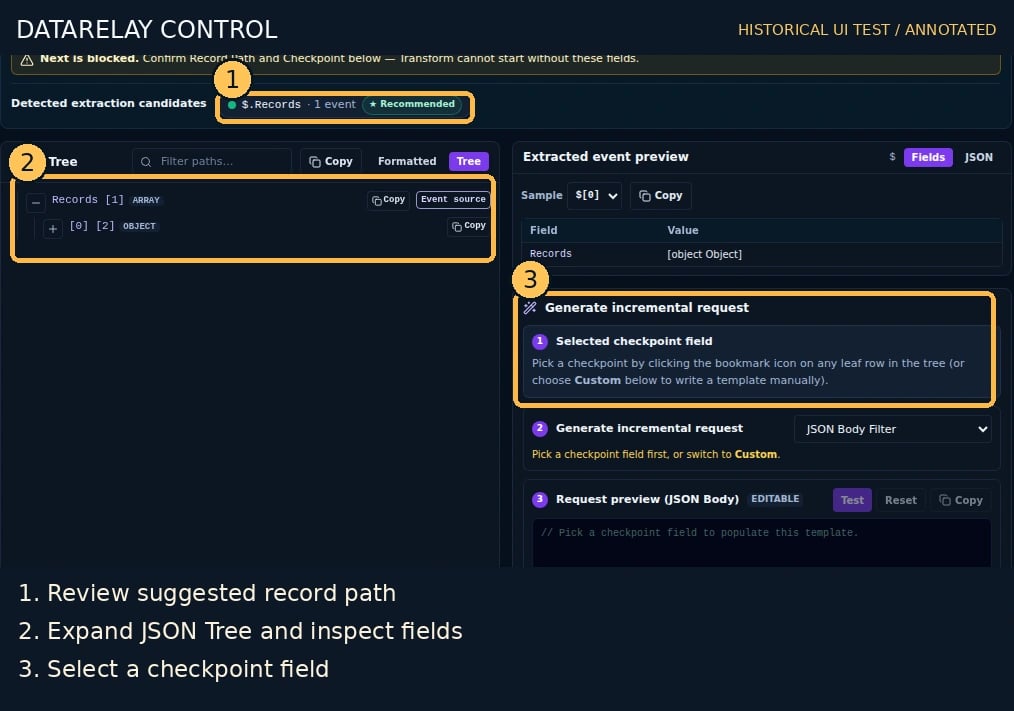
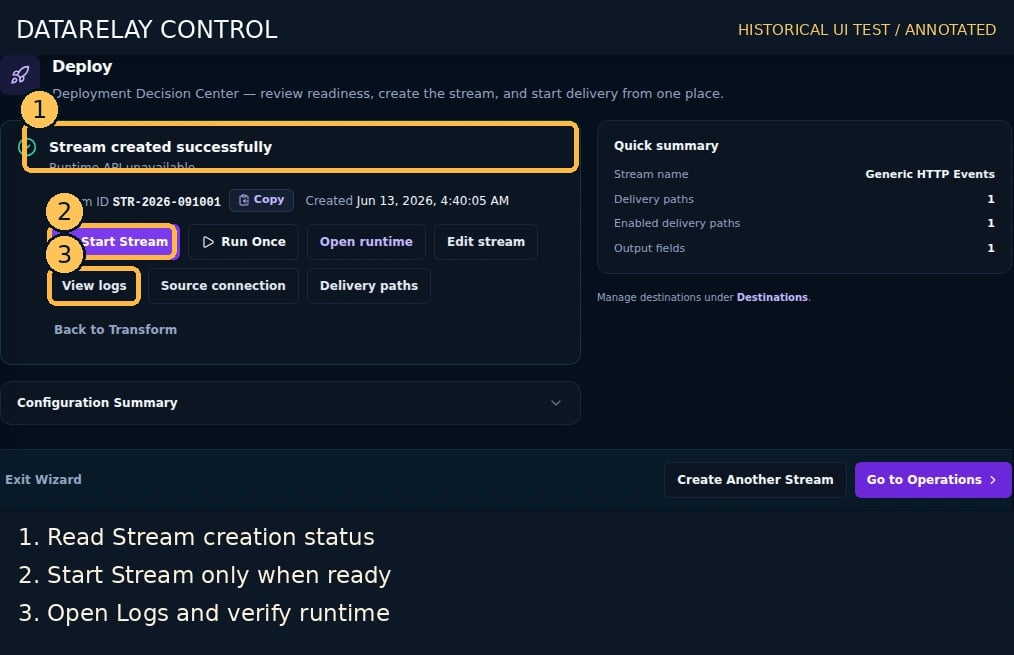
Goal: collect events from a test file on an SSH/SFTP server. SFTP-compatible SCP mode is a specific supported option; it is not arbitrary legacy SCP directory polling.Screen version: The numbered images are historical Control UI test captures. Follow the current five-step flow (Connect → Sample & Record Selection → Destinations → Route Processing → Deploy), not older step ordering. See the numbered screenshot guide.
End-to-end workflow and acceptance
- Prepare requirements: consult the vendor’s official API/integration guide for endpoint, authentication, least-privilege scope, pagination/checkpoint and sample response. Obtain sanitized test events and actual Destination connectivity information.
- Use ChatGPT for unknowns: supply public documentation and redacted samples; request a checklist of Connector inputs, request parameters, event root, timestamp/ID, cursor and unknowns. Never share secrets. Validate the response with the vendor guide and Run Test.
- Create Connector: Connectors → Create Connector, choose this page’s source type, enter real connection/auth details, save and test connectivity.
- Create Destination: Destinations → Create, choose SYSLOG_UDP/TCP/TLS or WEBHOOK_POST, and configure the actual receiver’s host/port/URL, TLS and authentication.
- Create Stream: Streams → Create → Connect, choose the saved Connector and configure source collection/request settings.
- Confirm samples and schema: Sample & Record Selection → Run Test; verify extracted records, Record Root, Union Schema, pagination and checkpoint.
- Process events: select Destination/Route; configure Mapping, timestamp, enrichment, Masking/Drop/Quarantine in Route Processing. Use Tokenization only if the deployed product supports it. Verify effective Route state and actual output.
- Deploy and prove delivery: resolve readiness findings, start the Stream, and correlate Run ID, Route Logs and the independent Destination receipt. All three are required for PASS.
- Diagnose: for connection/auth check API scope, TLS, network and 429; for zero records check record root/pagination; for failed delivery follow Delivery Incident; for changed fields follow Schema Drift.
Suggested ChatGPT prompt
I want to collect this vendor’s logs using DataRelay Control. Based only on the public API guide and redacted JSON sample below, list required Connector connection/auth fields, API request/pagination, event root, timestamp/ID/checkpoint, mapping and sensitive-field protection, and failure diagnostics. Mark undocumented information ‘needs confirmation’ rather than inventing values.
1. Prepare the remote host
- On a dedicated test SSH server, create an allowed directory such as
/srv/control-demoand placeevents.jsonlcontaining:
- Create a least-privilege read-only SSH user. Confirm the account can list and read the file using your normal
sftpclient. - Record the trusted server SSH host key fingerprint. Do not disable host verification to make a test pass.
2. Configure Remote File Connector
- Choose Connectors → Create Connector → Remote file polling (SFTP / SFTP-compatible SCP mode).
- Set Connector Name =
Lab SFTP, Protocol =sftp. - Fill in the remote Host, Port (usually 22), and Username.
- Provide a permitted Password or Private key as supported by the form. Configure the server identity through known-hosts using the trusted fingerprint; choose the strict host-key verification policy.
- Configure remote directory/file selection (and file pattern where offered) for
/srv/control-demo/events.jsonl. Save, then run the supported remote connectivity/list test.
3. Test records and deliver
- Create a Stream in
/streams/new, chooseLab SFTP, and Run Test. - Verify a parsed record with
id=sftp-001; use Record Selection to confirm the event structure. - Choose the test Destination, review Route Processing and Deploy settings, and start the Stream.
- In Logs, correlate the run with the independent Destination receipt.
If it fails
- Host verification error: fix the recorded host key and trust chain. Never switch to insecure verification to make production pass.
- Permission denied: verify the SSH account’s file/directory permissions.
- No extracted records: inspect remote file encoding/format and Record Selection.
- Duplicate records: inspect source checkpoint/position and file rotation strategy.